AI Background Remover for Fashion Stores The Complete Guide to Professional Product Photos
For an online fashion store, product photography can make the difference between someone scrolling past your product and someone clicking Buy Now.
Customers cannot touch a dress, inspect the stitching on a jacket, or try on a pair of shoes through their screen. They rely heavily on product images to understand what they are buying. If your photos have cluttered backgrounds, inconsistent lighting, distracting objects, or uneven presentation, your store can look less professional even when your products are excellent.
That is why an AI background remover for fashion stores has become a practical solution for eCommerce brands, boutiques, Shopify sellers, WooCommerce stores, dropshippers, and marketplace sellers.
Instead of spending hours manually selecting edges in Photoshop, you can use AI to isolate clothing, models, shoes, handbags, accessories, and other products in seconds.
With Free Background Remover AI fashion store, you can remove unwanted backgrounds, create transparent product images, and prepare cleaner visuals for your online store and marketing campaigns.
In this guide, you'll learn how AI background removal works, why it matters for fashion eCommerce, how to use it, and how to create more consistent product images across your sales channels.
Why Product Images Matter for Fashion Stores
Fashion is an extremely visual industry.
Before reading your product description, customers usually look at the image first. Your product photo needs to communicate important information immediately:
What the product looks like
Its color and overall design
The shape and fit
Important details such as buttons, stitching, patterns, and textures
Whether the product appears trustworthy and professionally presented
A poor image can create unnecessary doubt.
For example, imagine two stores selling the same type of hoodie. One has a clean product image on a consistent background, while the other uses a dark bedroom wall with furniture visible behind the model.
Even if the second hoodie is better quality, the first store may appear more trustworthy.
This is where AI product image editing can help fashion businesses create a consistent visual identity without investing in expensive photography equipment or advanced editing software.
What Is an AI Background Remover?
An AI background remover is an online image editing tool that uses artificial intelligence to identify the main subject of a photograph and separate it from its background.
For a fashion product image, the AI can identify elements such as:
Dresses
Shirts
T-shirts
Hoodies
Jackets
Pants
Shoes
Handbags
Jewelry
Accessories
Models
Mannequins
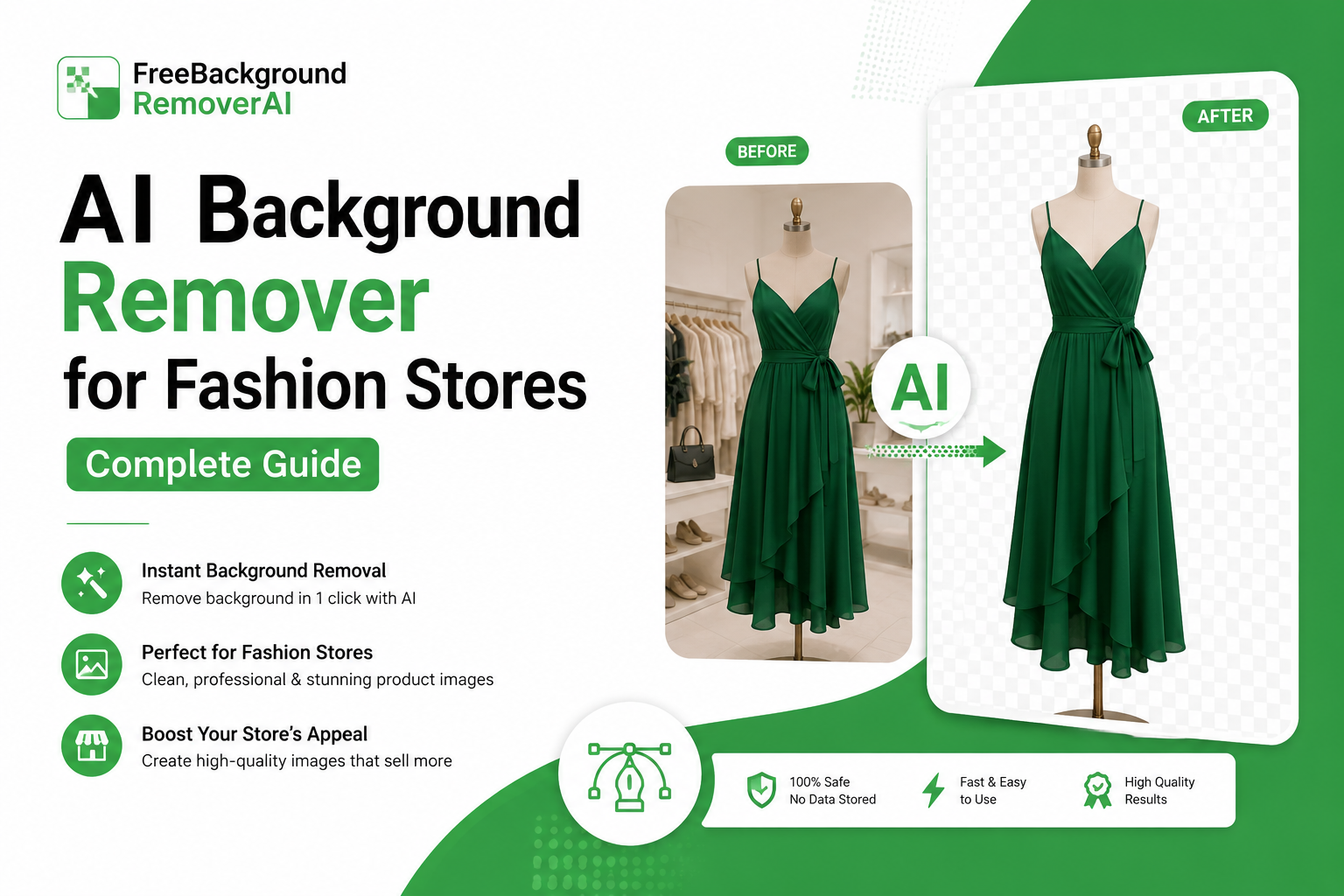
After detecting the subject, the tool removes the unwanted background and creates a clean product cutout.
Depending on the tool and workflow, you can then use the result as a transparent PNG, place the product on a white background, or create a completely new visual for your marketing campaign.
Unlike older background-removal techniques that depended heavily on manual selection, modern AI tools can recognize complicated shapes and edges automatically.
Why Fashion Stores Need AI Background Removal
Fashion photography comes with several editing challenges.
Clothing rarely has simple rectangular edges. Dresses may have flowing fabric, jackets can have complicated outlines, and accessories may contain tiny details.
AI background removal can simplify this process.
1. Complex Clothing Edges
Clothing can contain folds, sleeves, straps, collars, fringes, and other irregular shapes.
Manually selecting these areas can take considerable time. AI can automate much of the initial selection process.
2. Consistent Product Catalogs
Imagine uploading 300 products to your store.
If every photograph has a different background, your collection page can look inconsistent.
Using the same background-removal workflow helps create a more unified appearance.
3. Faster Product Publishing
Fashion stores frequently launch new collections and seasonal products.
Instead of waiting for every image to be manually edited, AI can speed up the preparation process so products can be published sooner.
4. Multiple Marketing Channels
The same product may appear on:
Shopify
WooCommerce
Amazon
Etsy
eBay
Instagram
Facebook
Pinterest
TikTok
A transparent product image gives you more flexibility when creating different versions for these channels.
Main Benefits of an AI Background Remover for Fashion Stores
Using AI for product image editing can provide several practical benefits.
Faster Editing
Traditional manual background removal can require careful selection and masking.
AI automates much of the process, allowing you to prepare images in seconds rather than editing every edge manually.
Better Visual Consistency
A consistent image style makes an online store look more organized and professional.
You can standardize:
Background color
Product positioning
Image dimensions
Visual spacing
Overall catalog style
Lower Editing Costs
Small businesses may not have the budget to hire a professional photo editor for every product.
An AI background remover can reduce the amount of repetitive editing work required.
Easier Content Creation
Once you have a transparent product cutout, you can use it in many different designs.
For example, you can place a jacket on:
White backgrounds
Brand-colored backgrounds
Seasonal promotional designs
Social media graphics
Website banners
Advertising creatives
Faster Catalog Expansion
If your store adds products frequently, a faster image editing workflow can make it easier to keep your catalog updated.
How AI Background Removal Works
Although the process looks simple to the user, several AI-powered steps can happen behind the scenes.
Step 1: Subject Detection
The AI analyzes the image and identifies the main subject.
For a fashion photograph, this could be a dress, model, shoe, handbag, or other product.
Step 2: Background Separation
The system determines which areas belong to the subject and which areas belong to the background.
Step 3: Edge Refinement
The edges are refined so the product doesn't look like it was roughly cut out.
This is particularly important for clothing with detailed outlines.
Step 4: Background Removal
The unwanted background is removed, leaving the product isolated.
Step 5: Export
The finished image can then be downloaded and used for your website, marketplace listings, social media, or further graphic design.
What Is the Best Background for Fashion Product Images?
There isn't one background that works for every situation.
Your choice should depend on where the image will be used.
White Background
White is one of the most useful choices for eCommerce product photography.
It creates a clean appearance and keeps attention on the product.
For marketplace listings, always check the platform's current image requirements before publishing.
Transparent Background
A transparent background is useful when you want maximum flexibility.
You can place the product over different backgrounds without removing the original background again.
Soft Grey Background
A light grey background can provide slightly more visual separation than pure white while maintaining a clean studio appearance.
Brand-Colored Background
For social media and advertising, you can use your brand colors to create a recognizable visual identity.
However, avoid using strong colors when they make the product difficult to see.
AI Background Removal for Shopify Fashion Stores
Shopify merchants can benefit significantly from consistent product photography.
A professional product catalog should ideally have a recognizable image style across different products and collections.
A simple workflow can be:
Photograph the product.
Upload the image to an AI background remover.
Remove the unwanted background.
Review the product edges.
Create a transparent master image.
Add the appropriate background.
Resize and compress the final image.
Upload it to Shopify.
You can also create separate image versions for your product page, collection banners, advertisements, and social media campaigns.
AI Background Removal for WooCommerce Stores
WooCommerce stores can use the same basic workflow.
Because WooCommerce is highly customizable, store owners have considerable flexibility in how product images are displayed.
For best results:
Use consistent image dimensions.
Keep backgrounds visually consistent.
Compress large images.
Use descriptive image filenames.
Add useful alt text.
Check product images on mobile devices.
If you have hundreds of products, creating a standardized image editing process can save significant time.
Preparing Fashion Images for Amazon
Marketplace requirements are different from those of your own website.
For Amazon, the main product image commonly uses a pure white background, but requirements can vary by product category and marketplace.
Before publishing, check Amazon's current seller image requirements.
An AI background remover can help you create a clean isolated product image, but the final image should always be reviewed against the platform's requirements.
Using AI Background Removal for Etsy and eBay
Fashion sellers on Etsy and eBay can also benefit from cleaner product photography.
Instead of using the same raw photograph everywhere, you can create multiple versions from one original image.
For example:
Version 1: Clean product image for the listing
Version 2: Lifestyle image for promotional content
Version 3: Branded image for social media
This approach allows one product photograph to support several marketing activities.
AI Background Removal and Ghost Mannequin Photography
The ghost mannequin effect is popular in fashion eCommerce.
The goal is to make clothing appear as though it is being worn without showing the mannequin or model.
This creates a clean, professional appearance that focuses attention on the garment.
AI background removal can be an important part of this workflow because it helps isolate the garment from its original environment.
However, creating a complete ghost mannequin image may require additional editing depending on how the garment was photographed.
How to Remove the Background from Clothing Photos
You don't need advanced Photoshop knowledge to get started.
Here's a simple workflow using Free Background Remover AI.
Step 1: Choose Your Product Photo
Select a clear photograph of your clothing, accessory, model, or product.
For the best results, use an image where the product is clearly visible.
Step 2: Upload the Image
Open the background removal tool and upload your product photograph.
Step 3: Let AI Detect the Product
The AI analyzes the photograph and identifies the primary subject.
Step 4: Remove the Background
The unwanted background is automatically separated from the product.
Step 5: Review the Result
Check the edges carefully.
Pay special attention to:
Sleeves
Hair
Straps
Lace
Fur
Fringe
Jewelry
Small accessories
Step 6: Download the Result
Save the transparent version as your master product image.
Step 7: Create Additional Versions
From your master image, you can create white background, branded, or promotional versions.
How to Create Consistent Fashion Product Images
Background removal is only one part of professional product photography.
For a consistent catalog, create simple rules for your entire store.
For example:
Background: White
Image ratio: 1:1
Product position: Centered
Product size: Similar across images
Lighting: Bright and consistent
File format: Platform appropriate
File naming: Descriptive and organized
The important thing is not necessarily which style you choose.
The important thing is consistency.
Product Image SEO: What Fashion Stores Should Know
Removing a background does not automatically make an image rank higher in Google.
However, properly optimized product images can contribute to a better overall website experience.
Before uploading an image, consider:
Use Descriptive File Names
Instead of:
IMG_8921.jpg
Use something descriptive, such as:
black-womens-hoodie.jpg
The filename should accurately describe the image rather than being stuffed with keywords.
Write Useful Alt Text
Alt text should describe the image naturally.
For example:
Black oversized women's hoodie
is more useful than:
best cheap black hoodie fashion hoodie online hoodie
Compress Images
Large image files can increase page load time.
After editing your product image, optimize the file so it maintains good visual quality without unnecessary file size.
Use Appropriate Dimensions
Don't upload a huge image when the website only displays a much smaller version.
Use image dimensions appropriate for your store and platform.
How Better Product Images Can Improve Conversion Potential
A product photograph cannot guarantee more sales.
However, high quality visuals can help customers understand products more clearly and make your store look more trustworthy.
For fashion stores, consider showing:
Front view
Back view
Side view
Close-up details
Fabric texture
Product worn by a model
Clean product only image
A clean background can be especially useful for the main product image, while lifestyle photography can show customers how the product looks in context.
The two approaches work well together.
Common Fashion Product Photography Mistakes
Even with AI, there are several mistakes worth avoiding.
Using Different Background Styles
A collection where every product has a different background can look unorganized.
Ignoring Product Edges
Always inspect complicated edges before publishing.
Uploading Huge Images
Large files can unnecessarily increase page weight.
Using Poor Source Photos
AI cannot completely fix every photography problem.
If the original product is extremely dark, blurry, or poorly exposed, the final result may still require additional editing.
Forgetting Mobile Users
Always check how product images look on smaller screens.
Overusing Branded Backgrounds
Your background should support the product rather than compete with it.
AI Background Removal for Social Media Fashion Content
Your product cutouts can also be useful outside your online store.
Use transparent product images to create branded posts, promotional graphics, collection announcements, and product highlights.
Fashion products can be combined with lifestyle layouts and vertical designs.
Clean product images can create a consistent appearance across your catalog and promotional campaigns.
TikTok
Product cutouts can be placed into promotional graphics and video compositions.
The benefit is simple: you can reuse one professionally prepared product image across multiple content formats.
Who Can Benefit from an AI Background Remover?
AI background removal isn't only for large fashion companies.
Small Boutiques
Boutique owners can turn simple product photographs into cleaner catalog images without advanced editing skills.
Shopify Entrepreneurs
Store owners can create consistent images for newly launched products.
Dropshipping Businesses
Sellers can remove inconsistent supplier backgrounds and create a more unified store appearance.
Clothing Brands
Growing brands can process large numbers of product images while maintaining a consistent visual style.
Marketplace Sellers
Amazon, Etsy, and eBay sellers can prepare product images for different listing requirements.
Social Media Sellers
Instagram and TikTok sellers can create product cutouts for promotional content.
Photographers
Product photographers can use AI background removal as part of a faster post-production workflow.
How to Get Better Results from AI Background Removal
For the best possible results, start with a good source image.
Use Good Lighting
Make sure the product is clearly visible.
Avoid Extreme Blur
AI works best when the subject has recognizable edges.
Separate the Product from the Background
A strong difference between the product and its background can make segmentation easier.
Keep the Product Fully Visible
Whenever possible, avoid cutting off important parts of the product.
Review the Final Cutout
Even highly capable AI tools should be checked before publishing important commercial images.
How AI Can Change a Fashion Store's Workflow
Without AI, a typical workflow might look like:
Photography → Manual selection → Masking → Background replacement → Export → Compression → Upload
With AI, much of the repetitive work can become:
Photography → AI background removal → Review → Background selection → Compression → Upload
The difference becomes significant when you're managing dozens or hundreds of products.
Frequently Asked Questions
What is an AI background remover for fashion stores?
It is an AI-powered tool that automatically detects clothing, models, shoes, accessories, and other subjects and separates them from their backgrounds.
Can AI remove backgrounds from clothing photos?
Yes. AI background removal tools can be used for many clothing images, including shirts, dresses, jackets, hoodies, trousers, and other fashion products.
What is the best background for clothing product photos?
A clean white or neutral background is a common choice for eCommerce product photography. However, the best option depends on your platform, branding, and the purpose of the image.
Can I remove the background from a Shopify product image?
Yes. You can remove the background before uploading the finished product image to Shopify.
Do I need Photoshop to remove a product background?
No. AI background-removal tools are designed to automate much of the process, so you don't need advanced Photoshop skills.
Can I create transparent product images?
Yes. A background remover can create a transparent cutout that can be saved as a PNG when transparency is supported.
Is AI background removal useful for dropshipping stores?
Yes. Dropshipping stores often receive product images from different suppliers. Removing the original backgrounds can help create a more consistent visual style.
Can AI remove backgrounds from model photos?
Yes. AI background removal can be used to isolate models as well as individual fashion products.
Can AI handle clothing with complicated edges?
AI can handle many complex edges, but results depend on the original image. Clothing with lace, fringe, fur, thin straps, or fine details should always be reviewed after processing.
Does background removal improve SEO?
Background removal itself is not a direct SEO ranking factor. However, properly optimized product images can support page performance, accessibility, user experience, and image search optimization.
What file format should I use?
PNG is useful when you need transparency. JPG or other compressed formats can be appropriate when transparency is not required. Choose the format that fits your platform and quality requirements.
How can I make my fashion product catalog look consistent?
Use a standardized workflow for image dimensions, backgrounds, product positioning, lighting, and compression. Applying the same process across your catalog creates a more professional appearance.
Can I use one product image for multiple platforms?
Yes. Starting with a clean master image gives you the flexibility to create versions for your website, marketplaces, advertising, and social media.
How long does AI background removal take?
Processing time depends on the tool, image, and server conditions, but automated background removal is generally much faster than manually creating a detailed mask.
Is Free Background Remover AI free?
Free Background Remover AI provides an online background-removal solution that lets users remove image backgrounds without installing traditional desktop editing software. Check the current tool for available features and usage limits.
Final Thoughts
Professional product photography is one of the most important visual elements of a fashion eCommerce store.
You don't necessarily need an expensive studio or advanced Photoshop skills to create cleaner product images. An AI background remover for fashion stores can automate one of the most repetitive parts of product image editing and help you prepare consistent visuals faster.
Whether you're running a small boutique, Shopify store, WooCommerce website, dropshipping business, or fashion brand with hundreds of products, the workflow is straightforward:
Upload → Remove → Review → Customize → Optimize → Publish
Start with a clean source photograph, remove the distracting background, keep a transparent master copy, and create platform specific versions when needed.
Ready to clean up your next fashion product photo?
Try Free Background Remover AI fashion store and turn ordinary product images into cleaner, more flexible visuals in seconds.
You can also explore the Free Background Remover AI blog for more practical guides on AI-powered image editing and product photography.
Share this guide with your team