Best AI Image Upscaler for Old Photos in 2026: Restore & Enhance
Old photographs hold memories that cannot be replaced. A wedding portrait of your grandparents, a childhood photograph, an old school picture, or a faded family snapshot can be priceless even when the image itself is blurry, scratched, faded, or extremely low resolution.
The good news is that you no longer need expensive photo restoration software or professional editing skills to improve these pictures.
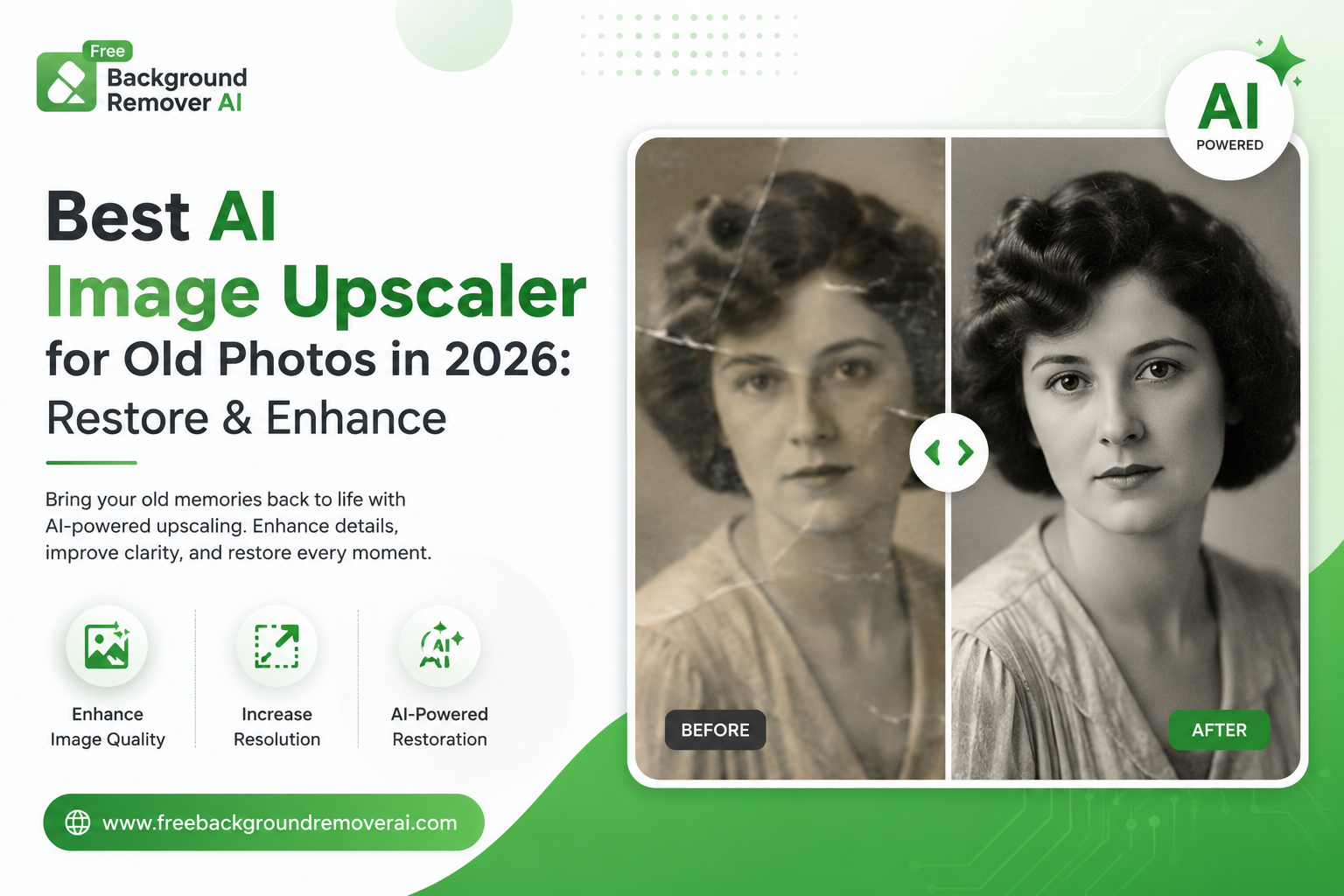
An AI image upscaler for old photos can increase image resolution, recover visible details, reduce noise, improve sharpness, and make aging photographs look clearer and more suitable for modern screens and printing.
In this guide, we'll explain how AI upscaling works, why old photos lose quality, what features to look for, how to upscale an old photo step by step, and how to get better restoration results.
If you want to try it immediately, you can use the AI Image Upscaler from Free Background Remover AI.
What Is the Best AI Image Upscaler for Old Photos?
The best AI image upscaler for old photos is a tool that can increase resolution while preserving natural-looking details instead of simply stretching the existing pixels.
Traditional image resizing makes an image larger, but it does not actually recreate missing information. This can leave an old photograph looking blurry, pixelated, or soft.
AI upscaling works differently.
Modern AI super-resolution models analyze patterns in an image and attempt to reconstruct missing visual details. Depending on the photograph, this can improve areas such as:
Facial details
Hair and clothing
Edges and outlines
Fine textures
Background details
Overall sharpness
Image resolution
Digital noise
For example, a small 400 × 300 pixel photograph may look much clearer after AI enhancement than it would after ordinary resizing.
However, AI cannot magically recover every detail from a severely damaged photograph. The quality of the original scan still matters, and extremely small or heavily damaged images may require additional restoration.
How Does an AI Image Upscaler Work?
AI image upscalers use machine-learning models designed to analyze low-resolution images and generate higher-resolution versions.
Instead of simply making individual pixels larger, the AI analyzes patterns within the photograph and reconstructs plausible details.
A typical AI upscaling process includes several stages:
1. Image Analysis
The AI first analyzes the photograph to identify edges, faces, textures, objects, and areas that contain noise or damage.
2. Detail Reconstruction
The model attempts to reconstruct missing details in important areas such as faces, hair, clothing, and backgrounds.
3. Noise Reduction
Old photographs often contain film grain, scanning noise, compression artifacts, or other unwanted visual information. AI processing can reduce some of this noise while preserving important details.
4. Sharpness Enhancement
Edges and important features are enhanced so the photograph appears clearer and less blurry.
5. Resolution Upscaling
The final image can then be generated at a larger resolution, such as 2× or 4× the original size, depending on the tool.
This combination makes AI upscaling particularly useful for old photographs that were originally captured using older cameras, scanned at low resolution, or compressed many times.
Why Do Old Photos Lose Quality?
Before restoring an old photograph, it helps to understand why the image has deteriorated.
Old photos commonly lose quality because of:
Aging and fading — Physical prints can lose color over time.
Scratches and creases — Handling and poor storage can damage the surface.
Low-resolution scanning — Old scans may contain very few pixels.
JPEG compression — Repeatedly saving an image can introduce compression artifacts.
Camera blur — Older photographs may have suffered from motion or focus problems.
Film grain — Film photography naturally contains grain that can become more noticeable after scanning.
Poor storage conditions — Heat, moisture, sunlight, and physical handling can accelerate deterioration.
AI can help address several of these problems, but different types of damage require different levels of restoration.
A slightly faded, low-resolution photograph is generally easier to improve than a photograph with missing sections, major tears, or severe physical damage.
AI Upscaling vs Traditional Image Resizing
One of the biggest differences between AI upscaling and conventional resizing is how the image is processed.
Traditional resizing mainly interpolates existing pixels. When you enlarge an image, the software estimates the colors of newly created pixels based on nearby pixels.
The image becomes larger, but it does not necessarily become more detailed.
AI upscaling attempts to reconstruct additional visual information using patterns learned by machine-learning models.
Traditional resizing
Increases dimensions
Uses existing pixel information
Can produce softness
Offers limited detail recovery
Useful for simple size adjustments
AI image upscaling
Increases image resolution
Reconstructs plausible details
Can improve sharpness
Can reduce certain types of noise
Can improve faces and textures
Better suited to restoration workflows
This is why an AI upscaler can be especially useful when working with old family photographs.
What Features Should the Best AI Upscaler Have?
Not every AI image upscaler provides the same results.
If you're choosing a tool for old photographs, look for these important features.
AI-Powered Super Resolution
The tool should use AI-based enhancement rather than only conventional image resizing.
Face Enhancement
Faces are often the most important part of a family photograph. A good restoration tool should be capable of improving facial clarity while keeping the person looking natural.
Noise Reduction
Old scans can contain grain and digital noise. Noise reduction can make the photograph cleaner and easier to view.
Sharpness Enhancement
A useful upscaler should improve clarity without making edges look excessively artificial.
Color Enhancement
Faded and yellowed photographs may benefit from color and contrast correction.
High-Resolution Export
If you plan to print the restored photograph, the tool should provide a sufficiently high-resolution output.
Browser-Based Processing
A browser-based tool is convenient because you don't need to install complicated desktop software.
Privacy and Secure Processing
Family photographs can contain personal information and irreplaceable memories. Always understand how a service handles uploaded images before processing sensitive photographs.
Why Use Free Background Remover AI for Old Photos?
Free Background Remover AI provides a browser-based collection of AI image tools designed to make image editing easier without requiring advanced editing skills.
Its AI Image Upscaler can be used to increase image resolution and improve visible detail.
You can also combine upscaling with other tools depending on what your photograph needs.
For example:
AI Image Upscaler — increase resolution and recover detail.
AI Image Enhancer — improve overall clarity and image appearance.
Background Remover — isolate the main subject from the background.
Blur Background — create a softer background effect for portraits.
This makes it possible to build a simple restoration workflow using multiple AI image tools instead of relying on complicated editing software.
How to Upscale an Old Photo With AI
You don't need professional photo-editing experience to try AI upscaling.
Follow these steps:
Step 1: Prepare Your Old Photo
Use the highest-quality version of your photograph available.
If you have the physical photograph, scan it at a high resolution whenever possible. Avoid using a heavily compressed screenshot or social-media copy.
Step 2: Open the AI Image Upscaler
Visit the AI Image Upscaler.
Step 3: Upload Your Photograph
Upload your old family photo, portrait, wedding picture, yearbook image, or another photograph that needs enhancement.
Step 4: Let the AI Process the Image
The AI analyzes the uploaded image and processes the available details.
Processing time can vary depending on the image size and current workload.
Step 5: Compare the Result
Compare the enhanced version with your original.
Look closely at:
Faces
Hair
Clothing
Edges
Backgrounds
Fine details
Noise
Overall sharpness
Step 6: Download the Improved Image
If the result meets your expectations, download the high-resolution version for digital archiving, sharing, or printing.
For additional clarity and color improvement, you can also try the AI Image Enhancer.
Can AI Restore Damaged Old Photos?
Yes, AI can improve many types of old photographs, but there are limits.
AI can often help with:
Mild blur
Low resolution
Digital noise
Film grain
Faded appearance
Compression artifacts
Reduced sharpness
Some minor scratches and imperfections
However, severely damaged photographs can be more difficult.
If part of a face, body, object, or background is completely missing, an AI model may generate plausible details rather than recover the exact original information.
For irreplaceable photographs, always keep the original file before performing any AI restoration.
Best Use Cases for AI Photo Upscaling
AI upscaling is useful in many situations.
Family Photos
Old family albums often contain photographs that were never stored digitally at high resolution. Upscaling can make them more useful for modern sharing and printing.
Wedding Photographs
Wedding photos captured decades ago may be faded, soft, or damaged. AI enhancement can improve their digital appearance.
Childhood Photos
Childhood photographs are often small prints or low-resolution scans. AI can make them easier to preserve and share.
School and Yearbook Photos
Old yearbooks can contain photographs that are difficult to read or view clearly. Upscaling can improve individual portraits.
Genealogy Projects
Family historians can use AI enhancement when digitizing photographs of ancestors and relatives.
Historical Archives
Schools, organizations, local groups, and individuals may have large collections of old photographs that need digital preservation.
Social Media
A restored high-resolution photograph can look significantly better when shared on modern social platforms than a small, heavily compressed original.
Common Mistakes When Upscaling Old Photos
Even the best AI image upscaler cannot compensate for a poor restoration workflow.
Avoid these mistakes.
1. Starting With an Extremely Small Image
If your original photograph is only a few dozen pixels wide, there may not be enough information for the AI to reconstruct accurately.
Start with the highest-quality source available.
2. Uploading a Screenshot
Screenshots and images downloaded from messaging apps or social media may already be compressed.
Whenever possible, use the original scan or digital file.
3. Over-Sharpening
Too much sharpening can create unnatural edges and make faces look artificial.
4. Editing the Original
Always keep an untouched copy of your photograph.
Create a separate enhanced version so you can return to the original later.
5. Ignoring Physical Damage
Upscaling primarily focuses on resolution and visual detail. Severe tears, missing sections, and major scratches may require additional restoration.
6. Expecting AI to Recover Exact Missing Information
AI can generate plausible details, but generated details are not necessarily identical to what existed in the original photograph.
This distinction is particularly important for historical and family archives.
How to Get Better AI Upscaling Results
The quality of your final image depends heavily on the source photograph.
Here are some practical tips.
Use a High-Quality Scan
If you are scanning a physical photograph, use a flatbed scanner when possible. A scan around 300–600 DPI can provide substantially more usable information than a low-quality phone photograph of a print.
Avoid Reflections
If you're photographing a physical picture instead of scanning it, use even lighting and avoid glare.
Keep the Original
Never overwrite the original photograph.
Store the untouched file separately before starting any enhancement.
Process Similar Photos Together
If you're restoring an entire family album, group photographs by condition.
For example:
Lightly faded photos
Low-resolution photos
Blurry photos
Heavily damaged photos
This makes it easier to choose an appropriate workflow.
Don't Overprocess Faces
Faces are extremely sensitive to AI enhancement. If an AI-generated face looks unnatural, reduce the amount of processing or try a different restoration workflow.
AI Upscaler vs AI Image Enhancer: What's the Difference?
Although the terms are sometimes used interchangeably, upscaling and enhancement have different primary purposes.
AI upscaling focuses mainly on increasing image resolution and reconstructing detail.
AI enhancement focuses more broadly on improving the visual appearance of an image through adjustments such as sharpness, clarity, contrast, color, and noise reduction.
For old photographs, you may benefit from using both.
A simple workflow could be:
Old photo → AI Upscaler → AI Enhancer → Final image
You can start with the AI Image Upscaler and then use the AI Image upscaler if the photograph needs additional visual improvement.
Frequently Asked Questions
What is the best AI image upscaler for old photos?
The best AI image upscaler for old photos should provide high-quality resolution enhancement, natural-looking detail reconstruction, noise reduction, and an easy workflow. Free Background Remover AI provides a browser-based AI upscaling option that you can try online.
Can AI restore old blurry photos?
Yes. AI can improve mild to moderate blur by enhancing edges and reconstructing details. However, extremely blurry photographs may have limited recoverable information.
Can AI make old photos higher resolution?
Yes. AI super-resolution can generate a larger image while reconstructing additional visual details.
Can I upscale an old photo for printing?
Yes. AI-upscaled images can be more suitable for printing than very small original files. The final print quality will depend on the original image, output resolution, and the size of the intended print.
Can AI remove scratches from old photos?
AI-based enhancement can reduce some scratches and imperfections, but severe physical damage may require dedicated restoration or manual editing.
Can AI restore faded or yellow old photos?
AI image enhancement can help improve contrast, color balance, and overall clarity in faded photographs. Severely discolored images may require additional color correction.
Can AI improve black-and-white old photos?
Yes. AI upscaling can improve resolution and detail in black-and-white photographs. Additional enhancement can be used if the image also has noise or fading.
What is the difference between upscaling and restoring an old photo?
Upscaling primarily increases resolution and reconstructs detail. Photo restoration is broader and can include scratch removal, color correction, noise reduction, sharpening, and repairing damaged areas.
What image formats can I use?
Common image formats used by online AI image tools include JPG, PNG, and WEBP. Always check the specific tool's supported formats before uploading.
How long does AI photo upscaling take?
Processing time depends on factors such as image size, resolution, and server workload. Many online AI tools process individual images within seconds.
Will AI make my old photo look exactly like the original?
Not necessarily. AI can reconstruct plausible details, but it cannot guarantee that newly generated details are identical to information that was lost from the original photograph.
Is AI photo upscaling free?
Some AI image upscaling tools offer free processing or free access with certain limitations. Free Background Remover AI provides an online AI image upscaling tool that you can try.
Do I need Photoshop to upscale an old photo?
No. Browser-based AI upscalers allow users to improve image resolution without requiring professional photo-editing software.
Final Verdict: Is AI Upscaling Worth Using for Old Photos?
If you have old family photographs that are small, blurry, faded, or difficult to use on modern devices, AI image upscaling is worth trying.
The best AI image upscaler for old photos should make the process simple while improving resolution, clarity, and visible detail without requiring advanced editing skills.
For the best possible result, start with the highest-quality scan available, preserve your original photograph, avoid excessive processing, and use additional enhancement when necessary.
You can start with the Free Background Remover AI Image Upscaler, then use the AI Image Enhancer if your photograph needs additional clarity or color improvement.
Share this guide with your team