Meme Generator Create Funny & Viral Memes Online for Free
If you have ever scrolled through Instagram, X, or WhatsApp and stopped to laugh at a perfectly timed meme, you already know why memes have become one of the most powerful forms of communication online. A meme generator is what turns that spark of an idea into a shareable image in under a minute, no design skills required.
Memes are no longer just jokes between friends. They are used by brands to boost engagement, by creators to grow their following, and by everyday people to react to trending moments in real time. The problem is that most meme tools online are cluttered with ads, hide your download behind a watermark, or require you to sign up before you can save anything.
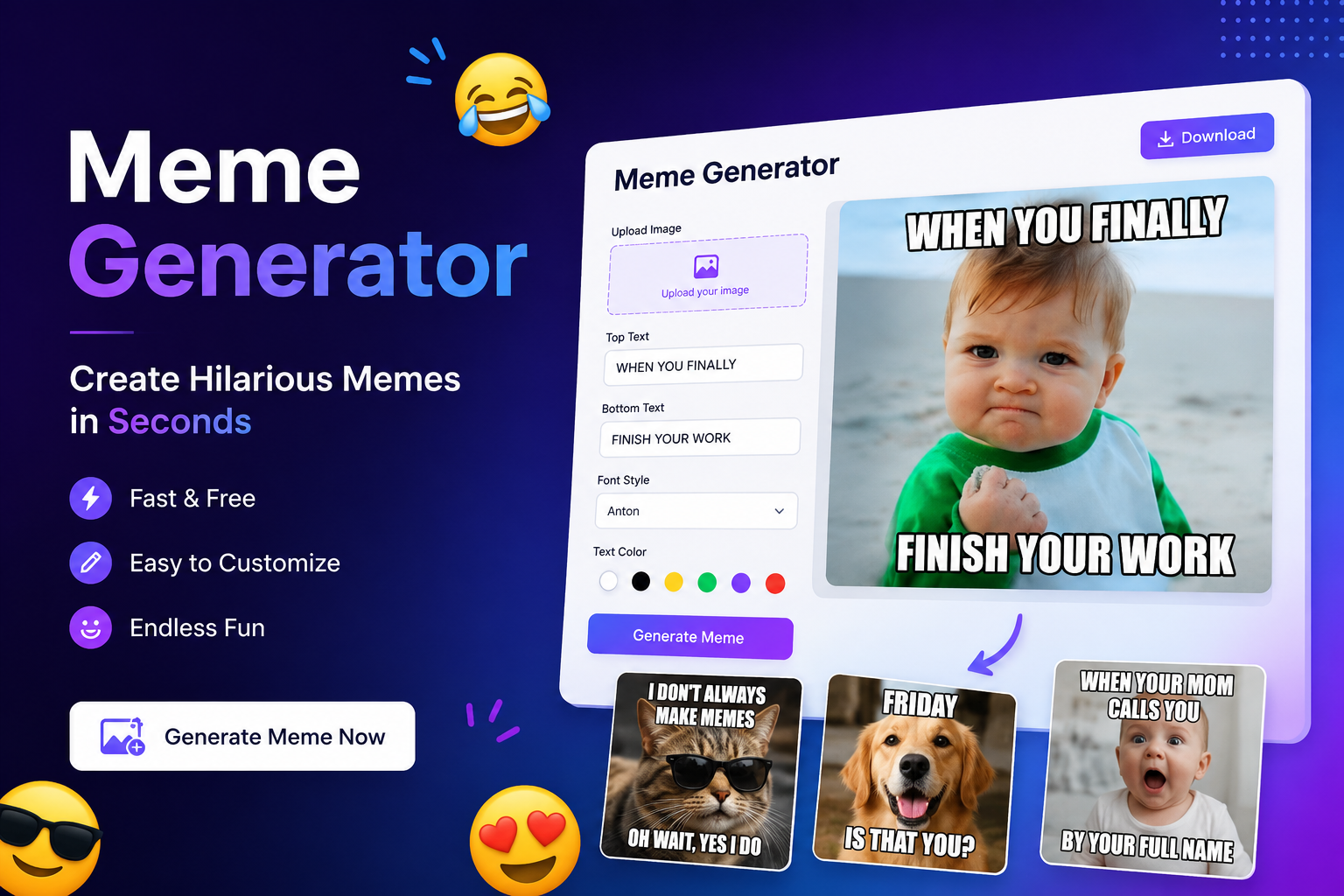
That is exactly the gap a good online meme maker should fill: pick a template or upload your own photo, add your caption, and download a clean, high-resolution image in seconds. Tools like the FreeBackgroundRemoverAI Meme Generator are built around that simplicity, letting anyone create memes online free of watermarks, subscriptions, or design software.
In this guide, you'll learn what a meme generator actually does, why memes matter for marketing and personal use, how to create one step by step, and the best practices that separate a meme that gets ignored from one that gets shared thousands of times.
What is a Meme Generator?
A meme generator is an online tool that lets you turn any image into a meme by adding text, captions, stickers, or effects, without needing design software like Photoshop.
At its core, a meme generator works in three simple layers:
The base image – either a pre-made template (like a reaction face or a trending format) or a photo you upload yourself.
The text layer – bold, high-contrast captions placed at the top, bottom, or anywhere on the image, usually in the classic Impact font or a custom style of your choice.
The export layer – the finished meme rendered as a downloadable image, ready to post directly to social media.
Modern tools go further than basic text overlays. An AI meme generator can suggest captions based on the image content, recommend trending formats, auto-resize your meme for different platforms, and clean up backgrounds so your custom photo blends naturally into a template. What used to take fifteen minutes in an image editor now takes under sixty seconds in a browser tab.
Why Memes Matter in Digital Marketing
Memes have moved from internet subculture to a mainstream marketing tool, and the reason is simple: they get shared. A well-made meme communicates a feeling or an opinion faster than a paragraph of copy ever could, which makes it one of the most efficient formats for engagement on social platforms.
Here is why memes matter for anyone building an audience or a brand online:
Engagement – Meme posts consistently generate higher likes, comments, and shares compared to standard image posts, because humor invites interaction.
Brand awareness – A recognizable, on-brand meme style helps a business stay visible in crowded feeds without feeling like an ad.
Viral reach – Platforms reward content that keeps people on the app longer, and memes are built for quick consumption and instant resharing.
Audience interaction – Memes lower the barrier to commenting; people tag friends, add their own captions, or reply with reactions.
Community building – Inside jokes and recurring formats create a sense of belonging among followers, which strengthens loyalty over time.
Marketers increasingly treat memes as a legitimate content pillar alongside blog posts and email campaigns, precisely because the cost of production is near zero when you have access to a fast, free meme maker.
Top Features of a Great Meme Generator
Not every meme tool is built the same way. Before you commit to one, it's worth knowing what separates a genuinely useful meme editor from a clunky one.
Drag-and-drop editor – Move text boxes, stickers, and images freely instead of being locked into fixed positions.
Custom fonts – Beyond the default Impact font, the ability to switch typefaces, sizes, and colors to match the tone of your meme.
Stickers and emojis – Small visual add-ons that boost personality without needing extra design work.
AI caption suggestions – Especially useful when you have a strong image but a blank mind for the joke.
Image upload – The option to use your own photos, screenshots, or branded visuals instead of only stock templates.
Template library – A searchable collection of popular and trending meme formats so you're never starting from a blank canvas.
Mobile-friendly interface – Since most meme consumption and creation happens on phones, the editor needs to work smoothly on small screens.
Watermark-free downloads – Nothing kills a meme's credibility faster than a competitor's logo stamped across the bottom.
High-resolution export – Crisp text and clean edges, even when the meme gets resized or reposted multiple times.
Fast processing – No long loading times between adding text and downloading the final image.
How to Create a Meme in Minutes
Creating a meme does not require any prior design experience. Here is the exact process using an online meme generator like FreeBackgroundRemoverAI:
Step 1: Choose a template or upload an image
Start by browsing the built-in template library for a trending format, or upload your own photo directly from your device. Both options load instantly into the editor.
Step 2: Add funny text
Click on the top or bottom text field and type your caption. Keep it short, punchy, and easy to read at a glance, since most people will view your meme for only a second or two before scrolling on.
Step 3: Customize fonts and colours
Adjust the font style, size, and color to make sure the text stands out clearly against the background image. High-contrast combinations, like white text with a black outline, tend to read best across all screen types.
Step 4: Resize for social media
Match the meme's dimensions to the platform you're posting on. Square formats work well for Instagram feed posts, while vertical formats are better suited for Stories, Reels, and TikTok.
Step 5: Download and share instantly
Export your finished meme in high resolution with no watermark, then post it directly or save it for later. The entire process, start to finish, typically takes under two minutes.
Best Uses for Meme Generators
Meme generators aren't limited to casual joking around. People and businesses use them across a wide range of platforms and purposes, including:
Instagram posts, Stories, and Reels covers
Facebook page updates and group posts
X (Twitter) replies and standalone posts
TikTok video thumbnails and overlays
WhatsApp status updates and group chats
Discord server reactions and channel banners
Reddit community posts
YouTube video thumbnails
Blog post header images
Email marketing campaigns
School and college projects or presentations
Personal entertainment and sharing with friends
Benefits of Using an Online Meme Generator
Switching from manual design software to a dedicated online meme maker comes with clear, practical advantages:
Speed – Go from idea to finished meme in under a minute.
No design skills required – The interface handles alignment, font weight, and spacing automatically.
Free access – No subscription or software purchase needed to get started.
Cloud-based – Nothing to install; everything runs in your browser.
Works on any device – Create memes equally well on a laptop, tablet, or phone.
Easy sharing – Download and post directly to your platform of choice within seconds.
Creative freedom – Full control over templates, fonts, colors, and image uploads.
Boosts engagement – Well-timed, relevant memes consistently outperform plain text or generic image posts.
Best Practices for Creating Viral Memes
A meme's success rarely comes down to luck. The ones that spread widely tend to follow a few consistent principles:
Know your audience – A joke that lands with one community can fall flat with another; tailor tone accordingly.
Keep text short – Long captions slow down the joke and reduce shareability.
Use trending formats – Recognizable templates get faster engagement because the audience already understands the context.
Use high-quality images – Blurry or pixelated visuals undercut even a great caption.
Stay relevant – Timing matters; a meme tied to a current event or trend performs far better within its first 24–48 hours.
Use humour wisely – Aim for relatable over shocking; longevity beats a single controversial spike.
Avoid offensive content – Jokes that alienate part of your audience limit both reach and brand safety.
Optimise for mobile – Since most viewing happens on phones, test readability at small sizes before posting.
Test different captions – Try two or three variations on the same image to see what resonates.
Follow current trends – Keep an eye on what formats are circulating that week; meme relevance fades quickly.
Common Meme Creation Mistakes
Even with a good tool, certain habits consistently hurt a meme's performance:
Too much text – Overloading the image dilutes the joke and slows readability.
Low-quality images – Stretched, pixelated, or poorly cropped visuals look unprofessional.
Poor font choices – Overly decorative or hard-to-read fonts undercut clarity.
Ignoring audience – Posting a niche in-joke to an unrelated audience reduces engagement.
Overused templates – Formats that have already peaked feel stale rather than fresh.
Bad timing – Posting a trend-based meme too late means missing the wave entirely.
Copyright issues – Using copyrighted characters or footage without rights can lead to takedowns.
Offensive humour – Content that punches down or targets sensitive topics risks backlash and platform penalties.
How Businesses Can Use Memes
Memes have earned a legitimate place in brand marketing strategy, particularly for companies trying to reach younger, social-first audiences. Practical applications include:
Marketing campaigns – Lightweight, low-cost content that fits naturally into a broader content calendar.
Advertising – Meme-style ads often outperform polished creative because they feel native to the platform.
Customer engagement – Responding to customer comments or reviews with a relevant meme humanizes the brand.
Product launches – A well-timed meme can generate buzz ahead of an announcement.
Brand awareness – Consistent meme style helps a brand's voice stick in followers' minds.
Social campaigns – Meme contests or challenges encourage user-generated content.
Email marketing – A single meme at the top of a newsletter can boost open engagement and shareability.
Community building – Recurring in-jokes turn casual followers into an engaged community.
Lead generation – Entertaining content increases follows and shares, which widens the top of the funnel.
Why Choose FreeBackgroundRemoverAI Meme Generator?
Among the many meme tools available, the FreeBackgroundRemoverAI Meme Generator is built specifically around removing friction from the process:
Fast meme creation – Templates and uploads load instantly, with no lag between edits.
No watermark – Every download is clean and ready to post immediately.
Easy text editing – Drag, resize, and restyle captions without needing any design background.
Clean interface – No pop-up ads or confusing menus interrupting the workflow.
High-quality downloads – Sharp, high-resolution exports that hold up even after multiple reposts.
Works on desktop and mobile – A consistent experience whether you're on a laptop or creating on the go.
Free to use – No subscription, no hidden paywall on exports.
No Photoshop required – Everything happens directly in the browser.
Perfect for beginners and professionals – Simple enough for a first-time user, flexible enough for a social media manager posting daily.
If you're already using tools like the AI Background Remover to clean up product photos or portraits, the meme generator fits naturally into the same workflow, letting you turn a background-removed image straight into a shareable meme.
Frequently Asked Questions
What is a meme generator? A meme generator is an online tool that lets you add text, captions, and effects to images to create memes without needing design software.
Is a meme generator free? Yes. The FreeBackgroundRemoverAI Meme Generator is completely free to use, with no subscription required to create or download memes.
Can I create memes without Photoshop? Yes, a browser-based meme generator handles all the text placement, fonts, and export formatting, so no design software is needed.
Can I upload my own images? Yes, you can upload personal photos, screenshots, or branded images instead of using only pre-made templates.
Can I download without a watermark? Yes, memes created with FreeBackgroundRemoverAI download in full resolution with no watermark added.
Is it mobile-friendly? Yes, the meme generator works smoothly on phones and tablets as well as desktop browsers.
Can businesses use memes for marketing? Yes, many brands use memes for social media engagement, product launches, and customer interaction because they feel native and low-pressure compared to traditional ads.
What image formats are supported? Most meme generators support common formats like JPG and PNG for both uploads and downloads.
Can AI generate meme captions? Yes, AI-assisted meme tools can suggest captions based on the image or trending formats, which is helpful when you're stuck for ideas.
How do I make a meme go viral? Focus on trending formats, keep the text short, post at the right time relative to the trend, and make sure the joke is relatable to a broad audience.
Do I need to create an account to use a meme generator? No, most free meme tools, including FreeBackgroundRemoverAI, let you create and download memes without signing up.
Can I resize memes for different social platforms? Yes, you can adjust dimensions to fit square, vertical, or landscape formats depending on where you're posting.
Are there templates for trending memes? Yes, a good meme generator regularly updates its template library to include current, trending formats.
Can I add stickers or emojis to my meme? Yes, most modern meme editors include a sticker and emoji library alongside the text tools.
Is it safe to use an online meme generator? Yes, as long as the tool doesn't require unnecessary account access or store your images without consent, browser-based meme generators are safe to use.
Can I edit the font and color of my meme text? Yes, you can customize font style, size, and color to match the tone of your meme.
What makes a meme funny? Timing, relatability, and simplicity, a strong meme usually says something the audience is already thinking, in the fewest words possible.
Can I use a meme generator for school projects or presentations? Yes, memes are increasingly used to add humor and engagement to presentations, especially for younger audiences.
Conclusion
A good meme generator removes every barrier between having an idea and sharing it: no design software, no watermark, no complicated export settings. Whether you're a business looking to boost social engagement or someone who just wants to make friends laugh in a group chat, the right tool comes down to speed, quality, and ease of use.
FreeBackgroundRemoverAI's Meme Generator was built around exactly those priorities, letting you create memes online free, in full resolution, without watermarks or sign-ups. Try it now and turn your next idea into a shareable meme in under a minute
Share this guide with your team