Remove Background from Car Photos: The Complete AI Guide for Professional Vehicle Images
A great car photo can be the difference between a scroll-past and a sale. Buyers judge a listing in the first two or three seconds, and a cluttered driveway, a messy garage, or a busy parking lot in the background pulls attention away from the one thing that actually matters: the car. That's why more dealerships, private sellers, and automotive marketers are learning how to remove background from car photos before they ever hit a marketplace, website, or ad.
The good news is that you no longer need Photoshop skills, expensive software, or hours of manual editing to get clean, professional vehicle images. With AI-powered tools like Free Background Remover AI, you can remove background from car photos instantly, replace it with something cleaner, and download a polished image ready to publish.
In this guide, you'll learn what background removal actually means for vehicle photography, why it matters for sales and marketing, how to do it step by step, what backgrounds work best, and the common mistakes to avoid. Whether you're a dealership manager, a private seller, or a marketing team handling hundreds of listings, this article will help you produce better car images faster.
What Does It Mean to Remove Background from Car Photos?
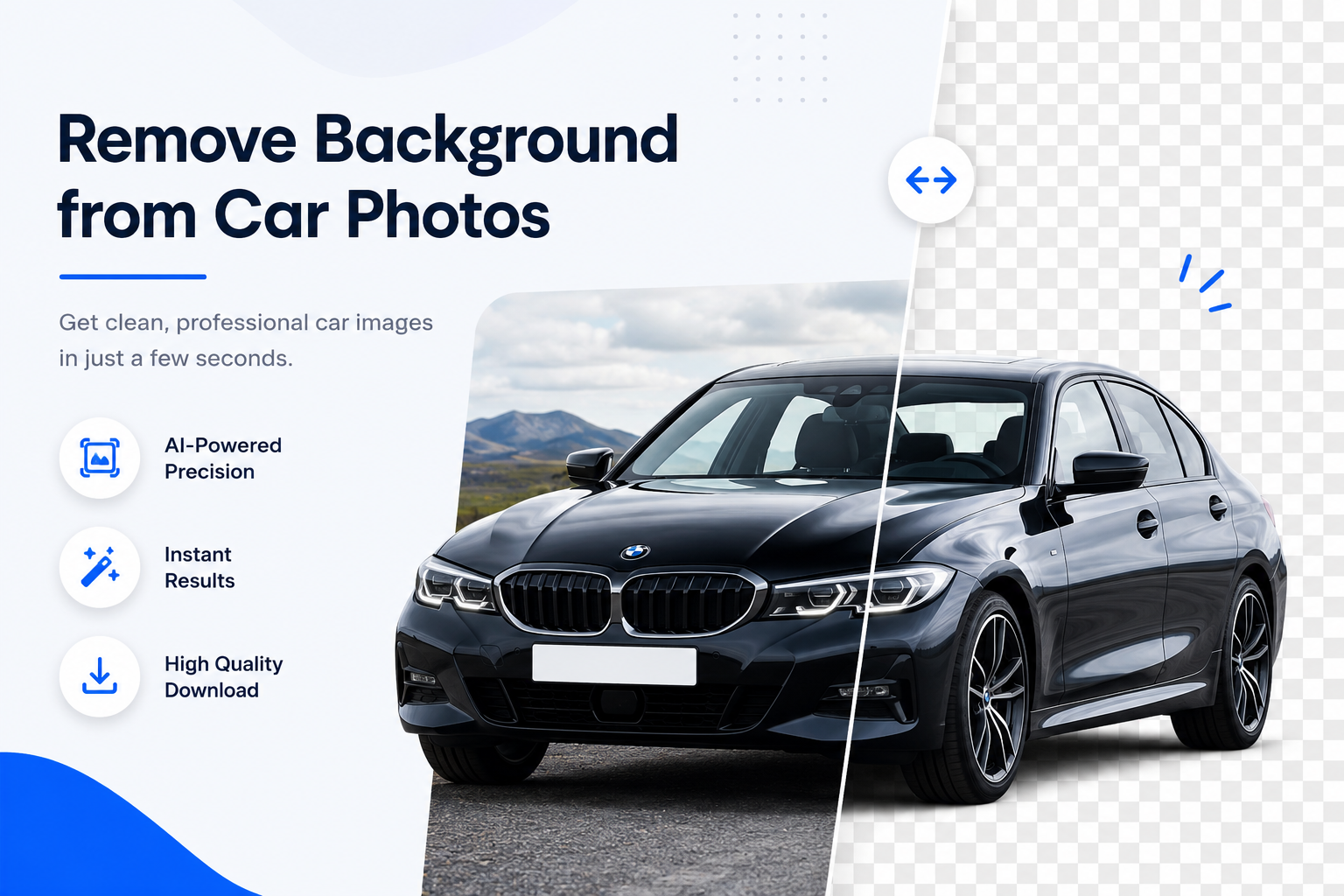
Removing the background from a car photo means isolating the vehicle from everything behind it — the driveway, the sky, the showroom floor, other cars, people, signage, or clutter — and leaving only the car itself, usually on a transparent or solid-color canvas.
The result is typically saved as a PNG file with a transparent background, which can then be:
Used as-is with a transparent backdrop
Placed on a clean white or gray background for marketplace listings
Composited onto a studio, showroom, or custom scene for marketing
Layered into ads, brochures, or social media graphics
This process used to require a skilled photo editor working manually in Photoshop, carefully tracing around mirrors, wheels, and door handles. Today, AI car background remover tools can do this automatically in seconds, detecting the shape of the vehicle and cutting it out with clean, precise edges — including tricky areas like alloy wheels, side mirrors, and window reflections.
Why Remove Background from Vehicle Images?
Clean, distraction-free car photos aren't just nice to have — they're increasingly expected across nearly every platform where vehicles are bought, sold, or advertised.
Online Marketplaces Sites where buyers compare dozens of listings side by side reward photos that look consistent and professional. A car photo with a transparent or clean background stands out instantly against cluttered, amateur-looking listings.
Dealership Websites Dealerships often want every vehicle in their inventory to appear on a matching background for a cohesive, branded look across the entire website — something only achievable with background removal.
Social Media Ads Ads perform better when the subject is instantly clear. A car isolated on a clean or bold background grabs attention faster while scrolling than one buried in a busy real-world scene.
Car Auctions Auction platforms rely on buyers making quick visual judgments. A distraction-free image helps the vehicle's condition and features stand out without background noise competing for attention.
Automotive Catalogs Catalogs and spec sheets typically require a uniform look across every vehicle, which means every image needs a matching, clean background — normally white or a neutral tone.
eCommerce Selling parts, accessories, or entire vehicles online works best when product photography looks polished, professional, and consistent, just like it does in any other eCommerce category.
Benefits of AI Car Background Removal
Switching from manual editing to an AI car background remover saves real time and money while actually improving quality.
Faster Editing What used to take 10–15 minutes per image in Photoshop can now be done in a few seconds with AI, which matters enormously when you're editing dozens or hundreds of vehicle photos.
Better Quality AI models are trained specifically to recognize complex shapes like wheels, mirrors, and glass, often producing cleaner edges than a rushed manual edit.
No Photoshop Skills Required There's no learning curve. You don't need to know how to use the pen tool, layer masks, or selection tools — you just upload a photo.
Automatic Edge Detection AI automatically identifies where the car ends and the background begins, including fine details like antennas, side mirrors, and wheel spokes.
Saves Money Hiring a professional photo editor for every listing adds up quickly. A free AI background remover eliminates that recurring cost.
Professional Results Consistent, clean backgrounds make every vehicle — whether it's a budget hatchback or a luxury SUV — look like it belongs in a professional catalog.
How to Remove Background from Car Photos Online
Using Free Background Remover AI to remove background from car photos is straightforward, even if you've never edited a photo before.
Step 1: Upload Your Photo Go to the AI Background Remover Tool and upload the car photo you want to edit. Most common image formats are supported.
Step 2: Let the AI Detect the Car The AI automatically analyzes the image and identifies the vehicle, distinguishing it from the surrounding background — including tricky elements like reflective paint, glass, and wheels.
Step 3: Background Removed Instantly Within seconds, the background is removed and you're left with the car on a transparent canvas.
Step 4: Download the PNG Download your new image as a transparent PNG file, ready to use however you need it.
Step 5: Replace the Background (Optional) If you want a white, studio, or custom background instead of transparency, you can add one on top of the transparent cutout to match your branding or listing style.
That's it — no software downloads, no manual selections, and no design experience required.
Best Backgrounds for Car Photography
Once the background is removed, you have full control over what goes behind the vehicle. The right choice depends on where the image will be used.
White Background — the standard for marketplaces and catalogs; clean, neutral, and universally accepted
Transparent — ideal for layering the car into websites, brochures, or custom designs
Studio Background — soft gradients or seamless backdrops that mimic a professional photo studio
Outdoor Showroom — a polished, realistic setting that suggests a dealership environment
Luxury Showroom — dramatic lighting and premium flooring for high-end vehicle marketing
Black Background — bold and high-contrast, often used for sports cars or performance vehicles
Gradient Background — a soft color transition that adds depth without distraction
City Background — a lifestyle-oriented setting that works well for social media and ad creative
Tips for Better Car Photos Before Background Removal
AI can only work with what it's given, so a better original photo means a better final result.
Lighting — shoot in soft, even daylight and avoid harsh midday shadows or glare on the paint
Camera Angle — a slight front three-quarter angle usually shows the car's shape best
Clean Vehicle — wash and dry the car first; dust and water spots are far more visible in photos
Avoid Shadows — strong shadows underneath or beside the car can make background removal look uneven
High-Resolution Photos — higher resolution images give the AI more detail to work with, especially around edges
Multiple Angles — capture the front, rear, sides, and interior for a complete listing
Common Mistakes to Avoid
Even with AI doing the heavy lifting, a few common photography and editing mistakes can hold your results back.
Busy Backgrounds — cluttered driveways, garages, or streets make it harder to isolate the car cleanly
Low-Quality Images — blurry or pixelated photos limit how sharp the final cutout can look
Poor Lighting — dark, overexposed, or unevenly lit photos distort the car's true color and detail
Cropped Vehicles — cutting off part of the car in the original shot can't be fixed after the fact
Incorrect Perspective — extreme angles can distort proportions and make the vehicle look less appealing
Industries That Benefit from Car Background Removal
Background removal isn't just for individual sellers — it's become a standard part of workflow across the automotive industry.
Dealerships — consistent inventory photos across their website and listings
Car Rental Companies — clean fleet images for booking platforms and marketing
Automotive Blogs — professional visuals for reviews, comparisons, and features
Insurance Companies — clear vehicle documentation for claims and records
Vehicle Marketplaces — standardized listing photos that build buyer trust
Auto Detailing Businesses — polished before-and-after or promotional imagery
Manufacturers — catalog and brochure-ready product photography
Marketing Agencies — fast turnaround on client ad creative
Auction Platforms — distraction-free photos that highlight vehicle condition
Why Choose Free Background Remover AI?
Free Background Remover AI is built specifically to make background removal fast, accessible, and genuinely useful for real-world photo editing needs, including car photography.
Free — no cost to remove backgrounds from your car photos
Fast — results in seconds, not minutes
AI-Powered — trained to accurately detect vehicle shapes and edges
High-Quality Cutouts — clean edges around mirrors, wheels, and glass
No Software Installation — works entirely online
Browser-Based — accessible from any device with an internet connection
Secure — your photos are handled safely
Beginner-Friendly — no design or editing experience needed
Whether you're editing one photo for a private sale or managing an entire dealership's inventory, the AI Background Remover Tool is built to handle it. You can also visit the blog for more tips on photo editing and vehicle photography.
Frequently Asked Questions
How can I remove the background from car photos for free? Upload your photo to a free AI tool like Free Background Remover AI, and the background will be removed automatically in seconds at no cost.
What is the best AI car background remover? The best tools use AI trained specifically to recognize vehicle shapes, including wheels, mirrors, and glass, for clean and accurate cutouts — which is exactly what Free Background Remover AI is designed to do.
Can I make my car image transparent? Yes. After removing the background, you can download your car photo as a transparent PNG file.
How do dealerships edit car photos? Most dealerships use AI background removal tools to quickly process large volumes of inventory photos with a consistent, professional look.
Does AI work on luxury cars? Yes. AI background removal works on any vehicle type, including luxury, sports, and exotic cars, accurately detecting reflective paint and complex body lines.
Can I replace the background after removing it? Yes. Once the original background is removed, you can add a white, studio, showroom, or custom background of your choice.
Is online car background removal safe? Reputable tools process images securely and don't misuse your photos. Always use a trusted platform when uploading images online.
Which image formats are supported? Most AI background removers support common formats like JPG and PNG for both uploads and downloads.
Can I use edited images for marketplaces? Yes. Clean, background-removed photos are widely accepted and often preferred on car marketplaces and listing sites.
How long does AI background removal take? Typically just a few seconds per image, depending on file size and internet connection.
Do I need Photoshop skills to remove a car background? No. AI tools are designed for anyone to use, regardless of editing experience.
Will background removal affect image quality? No, when done correctly, background removal preserves the resolution and detail of the original vehicle photo.
Can I remove backgrounds from multiple car photos at once? Many AI tools support batch or repeated uploads, making it efficient to edit an entire inventory of vehicle images.
What's the difference between a white background and a transparent background? A white background is a solid color fill, while a transparent background has no color at all — useful for layering the car onto different scenes later.
Is background removal only useful for selling cars? No. It's also widely used for marketing, advertising, catalogs, insurance documentation, and automotive content creation.
Conclusion
Clean, professional car photos aren't just about aesthetics — they directly impact engagement, buyer trust, and how quickly a vehicle sells or gets noticed. Learning how to remove background from car photos gives sellers, dealerships, and marketers a simple way to stand out in a crowded, image-driven market.
AI has made this process faster, more accessible, and more consistent than ever, removing the need for expensive software or advanced editing skills. With Free Background Remover AI, you get clean, professional-quality results in seconds — no experience necessary.
Share this guide with your team